Installation instructions Download MobAura Mod
– Make sure you have Minecraft Forge.
– Locate the Minecraft game folder: On Windows, open the Run dialog box, enter %appdata% and click the Run button. On a Mac, open Finder, hold down the ALT key and click Go> Library. Then open the Application Support folder and search for Minecraft.
– From here, drag in the mods file downloaded (.jar or .zip) you wish to add.
– Open Minecraft game, click on Mods button and explore.
If there is an error, please comment on this article we will support.
Relative Post:
How To Install Minecraft Forge (Modding API)?
4 steps to install forge for windows, mac, Linux
Step 1: Download and install MC Forge at the website
Step 2:Open the .jar file you just downloaded

Step 3:Select Install Client or Install Server if you want to install for your server, and click OK

Step 4:Launch Minecraft and select the Forge profile, then click Play.

Download MobAura Mod Description:
MobAura Mod for Minecraft adds some interesting things to your Minecraft world to make it more interesting as well as enhance your combat experience. Install the mod and discover now!

What is this mod?
MobAura creates an aura around you so mobs within 6 blocks of you are repeatedly attacked by your current item until they die. It attacks hostile mobs, farm animals, and ghast fireballs, but you can turn on the ability to attack water animals, tameable mobs (such as wolves or ocelots/cats), villagers, and other living creatures (such as golems or the ender dragon). You can also turn off the ability to attack the ones that are on by default. MobAura will not attack players, vehicles (such as minecarts or boats), or any players’ pets (yours or someone elses). MobAura is not intended for PVP.
MobAura will attack multiple mobs at the same time, but be careful on NoCheat servers with Auto-Ban. Note that MobAura has a nocheat-safe mode, which prevents attacking two mobs at the same time. This means it is less likely to be detected, not impossible to be detected.
Hit K to turn it on. If K is for something else that you’ve installed, change the key in the options window.
MobAura can also do the right-click option on mobs instead of the left click option. Use L to toggle whether to use the left-click or right-click option. If you don’t like L, you can change it to something else.
Mod Installation:
- Download and run the latest version of Minecraft Forge
- Download and install ThebombzenAPI
- Go to Start Menu > Type %appdata%/.minecraft/mods
- Download the mod
- Move the downloaded Jar (zip) file into the mods folder
- Done and Enjoy the mod.
MobAura Mod Download Links:
For 1.5.2
http://dl1.minecraftermods.net/index.php?act=dl&id=1417399839
For 1.6.2
http://dl1.minecraftermods.net/index.php?act=dl&id=1417399854
For 1.6.4
http://dl1.minecraftermods.net/index.php?act=dl&id=1417399868
For 1.7.10/1.7.2
http://dl1.minecraftermods.net/index.php?act=dl&id=1417399887
FAQ:
How to fix minecraft mod crash?
Mods Crashes can easily occur due to mod conflicts, wrong versions of mods, or buggy mods. If the player has installed several mods, if using the older launcher, they should try renaming the “bin” directory in the Minecraft folder, then start Minecraft (Or replace the current minecraft.
How do I delete Minecraft Mods?
What you could do it you have Windows is click on the start button and then search run. Click on the secound option. Then search apps. Next go roaming then .minecraft then mods and you should see all your mods. Click the one you want to delete and press delete or backspace.
How do I update Minecraft forge for the Server?
if you run into the case of your server is not starting and you see in the console it’s saying something along these lines;
Console :: net.minecraftforge.fml.common.MultipleModsErrored:
Console :: Missing Mods:
Console :: unknown : need [14.23.5.2768,): have 14.23.4.2760 (Your version of Mc forge may be different 14.23.5.2768)
Console :: Missing Mods:
Console :: unknown : need [14.23.5.2772,): have 14.23.4.2760
1. Open a browser and goto Link Here
2. Download the minecraft forge version you want to update
3. Save the file and run it
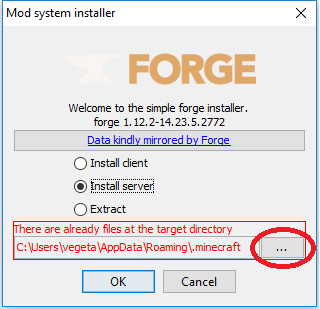
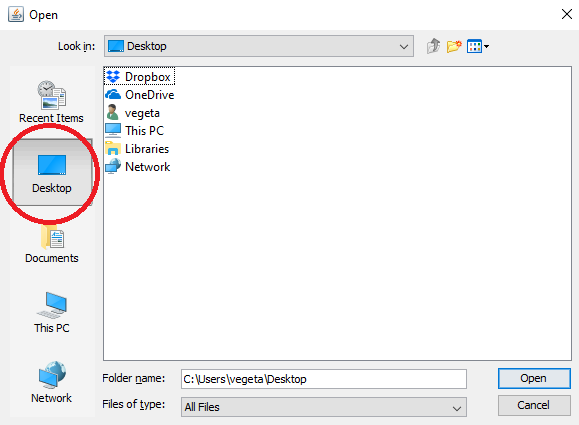
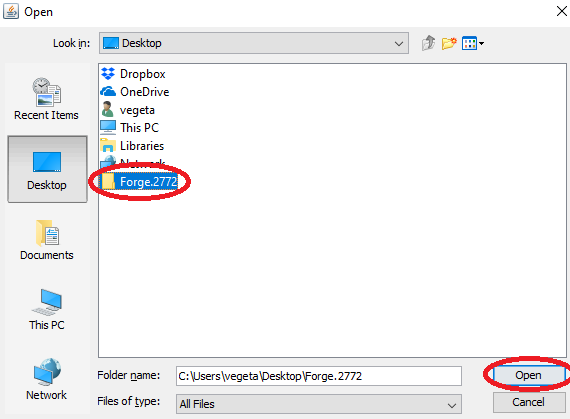
4. Select Install Server and click the box with “…”, click the desktop on the left and make a new folder called Forge.2772 and click Open and click OK
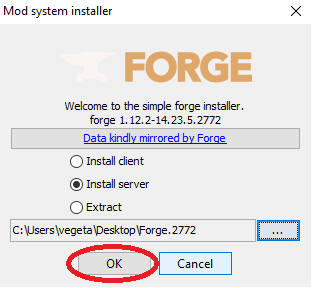
5. Go to the folder on your desktop Forge.2772, delete the minecraft_server.jar file and copy the forge-1.12.2-14.23.5.2772-universal.jar to ForgeMod.jar
Note – The ForgeMod.jar file is case sensitive, ForgeMod.jar is the only way it will work
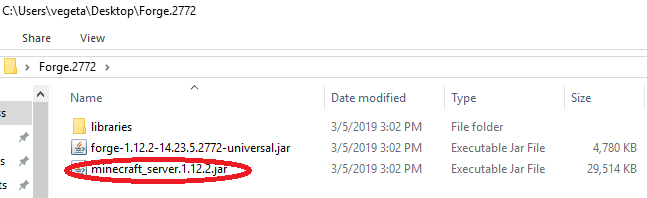

6. Once that is done, go to the servercraft control panel, stop your server and go in the file manager. Delete the ForgeMod.jar forge-1.12.2-14.23.5.2768-universal.jar files and the libraries folder
7. You can use the file manager to upload your files or use an FTP program, either way, you need to copy all the files and folder from your Forge.2772 on your desktop to your root folder on your server. With the file manager you can drag and drop files to upload them
8. Once done, you can start your server
9. You can verify in the console that you upgraded it correctly
DOWNLOAD MODS FOR PC
- Weapon
- Armor
- Furniture
- Decor
- Mobs
- Realism
- Cars
- Magic
- Lucky Blocks
List of Minecraft Mods. Below is the list of Minecraft Mods developed and modified by the Minecraft community.
The latest version is Minecraft 1.16.5 mods, Most popular versions are Minecraft 1.16.4 mods, Minecraft 1.15.2 mods, Minecraft 1.14.4 mods, Minecraft 1.12.2 mods, Minecraft 1.11.2 mods, Minecraft 1.10.2 mods, and Minecraft 1.7.10 mods.!
The post Download MobAura Mod appeared first on 24hMinecraft | The Best Minecraft Mods, Mods, Resource Pack.




/fit-in/580x348/filters:format(webp)/english-betterindia/media/media_files/2026/08/04/2-2026-08-04-18-31-45.png)

/pic9729642.png)