Installation instructions Download Magic Yarn Mod
– Make sure you have Minecraft Forge.
– Locate the Minecraft game folder: On Windows, open the Run dialog box, enter %appdata% and click the Run button. On a Mac, open Finder, hold down the ALT key and click Go> Library. Then open the Application Support folder and search for Minecraft.
– From here, drag in the mods file downloaded (.jar or .zip) you wish to add.
– Open Minecraft game, click on Mods button and explore.
If there is an error, please comment on this article we will support.
Relative Post:
How To Install Minecraft Forge (Modding API)?
4 steps to install forge for windows, mac, Linux
Step 1: Download and install MC Forge at the website
Step 2:Open the .jar file you just downloaded

Step 3:Select Install Client or Install Server if you want to install for your server, and click OK

Step 4:Launch Minecraft and select the Forge profile, then click Play.

Download Magic Yarn Mod Description:
Magic Yarn Mod for Minecraft, crafted by surrounding a Compass with Wool, is a very useful mod because with just one right click, you can just go wherever you want after crafting the Ball of Magic Yarn.

Note: In Multiplayer, you can’t craft this Item. You use a button instead, by default “J”. Button can be customized in auto-created file under mods/MagicYarn.txt
The Item serves as pathfinding Tool and to keep track of your movements. In other words, you should never again get lost exploring the Nether or some complex cave system, and without leaving a ridiculous amount of Torches to mark your trail.
[Nothing set]- Rightclick: Specifies your current location as point of origin.
- Rightclick: Sets your current location as waypoint. Computes the shortest (Manhattan) walkable path to the origin and displays it.
- Rightclick: Makes the path disappear. If you stand in a path while right clicking, any path after the point you stand in will be cut off and deleted (for circling around).
- You can only see the Path at all times while holding the Magic Yarn.
- Rightclick, short: Sets your current location as waypoint. Computes the shortest (Manhattan) walkable path to the LAST WAYPOINT and displays it.
- Rightclick, >0.5s: Sets your current location as waypoint. Computes the shortest (Manhattan) walkable path to the ORIGIN and displays it. If that fails, it falls back to the LAST WAYPOINT.
- Rightclick, >2.5s: Resets the Magic Yarn to the [Nothing set] status.
Technical Information for the interested:
- Features implementation of A* pathing Algorithm.
- A* is heuristic (that means its very efficient in open spaces) and my implementation has a binary heap sorting method aswell, which apparently is the best method for this task.
Magic Yarn Mod Installation:
- Download and run the latest version of Minecraft Forge
- Go to Start Menu > Type %appdata%/.minecraft/mods
- Download the mod
- Move the downloaded Jar (zip) file into the mods folder
- Done and Enjoy the mod.

Older versions:
====
For 1.5.1
http://dl3.minecraftermods.net/index.php?act=dl&id=1418263468
For 1.5
http://dl3.minecraftermods.net/index.php?act=dl&id=1418263485
For 1.4.7
http://dl3.minecraftermods.net/index.php?act=dl&id=1418263504
For 1.4.5
http://dl3.minecraftermods.net/index.php?act=dl&id=1418263519
====
For 1.5.2
http://dl3.minecraftermods.net/index.php?act=dl&id=1418263533
For 1.6.2
http://dl3.minecraftermods.net/index.php?act=dl&id=1418263550
For 1.6.4
http://dl3.minecraftermods.net/index.php?act=dl&id=1418263564
For 1.7.2
http://dl3.minecraftermods.net/index.php?act=dl&id=1418263578
For 1.7.10
http://dl3.minecraftermods.net/index.php?act=dl&id=1418263597
For 1.8
https://dl2.minecraftermods.net/index.php?act=dl&id=1425123923
Credits: AtomicStryker
FAQ:
How to fix minecraft mod crash?
Mods Crashes can easily occur due to mod conflicts, wrong versions of mods, or buggy mods. If the player has installed several mods, if using the older launcher, they should try renaming the “bin” directory in the Minecraft folder, then start Minecraft (Or replace the current minecraft.
How do I delete Minecraft Mods?
What you could do it you have Windows is click on the start button and then search run. Click on the secound option. Then search apps. Next go roaming then .minecraft then mods and you should see all your mods. Click the one you want to delete and press delete or backspace.
How do I update Minecraft forge for the Server?
if you run into the case of your server is not starting and you see in the console it’s saying something along these lines;
Console :: net.minecraftforge.fml.common.MultipleModsErrored:
Console :: Missing Mods:
Console :: unknown : need [14.23.5.2768,): have 14.23.4.2760 (Your version of Mc forge may be different 14.23.5.2768)
Console :: Missing Mods:
Console :: unknown : need [14.23.5.2772,): have 14.23.4.2760
1. Open a browser and goto Link Here
2. Download the minecraft forge version you want to update
3. Save the file and run it
4. Select Install Server and click the box with “…”, click the desktop on the left and make a new folder called Forge.2772 and click Open and click OK
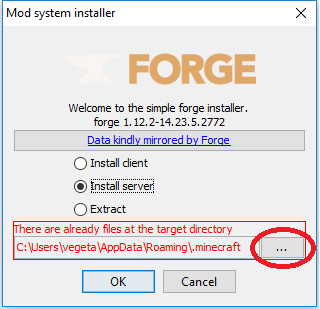
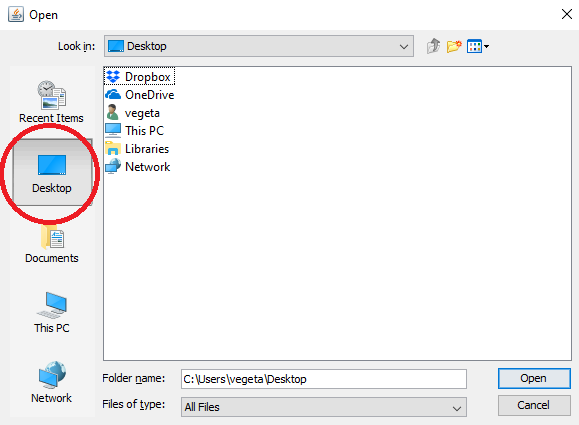
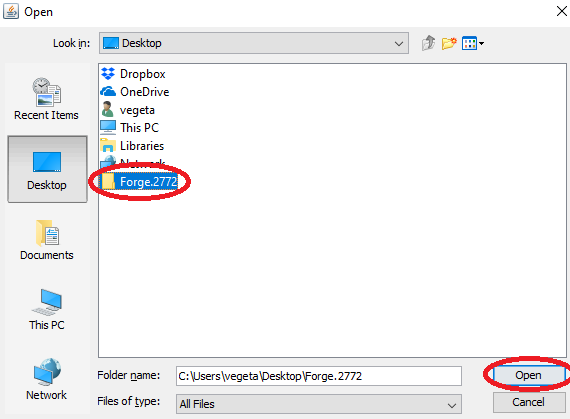
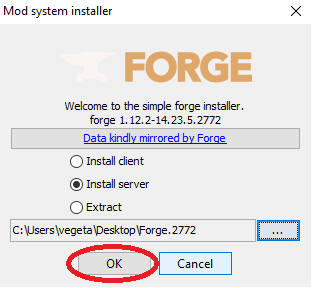
5. Go to the folder on your desktop Forge.2772, delete the minecraft_server.jar file and copy the forge-1.12.2-14.23.5.2772-universal.jar to ForgeMod.jar
Note – The ForgeMod.jar file is case sensitive, ForgeMod.jar is the only way it will work
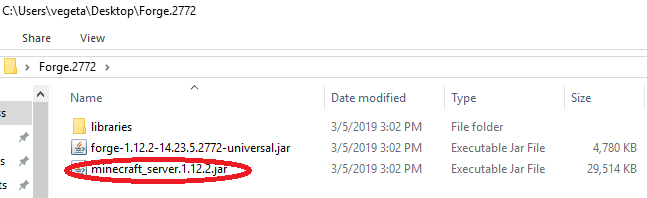

6. Once that is done, go to the servercraft control panel, stop your server and go in the file manager. Delete the ForgeMod.jar forge-1.12.2-14.23.5.2768-universal.jar files and the libraries folder
7. You can use the file manager to upload your files or use an FTP program, either way, you need to copy all the files and folder from your Forge.2772 on your desktop to your root folder on your server. With the file manager you can drag and drop files to upload them
8. Once done, you can start your server
9. You can verify in the console that you upgraded it correctly
DOWNLOAD MODS FOR PC
- Weapon
- Armor
- Furniture
- Decor
- Mobs
- Realism
- Cars
- Magic
- Lucky Blocks
List of Minecraft Mods. Below is the list of Minecraft Mods developed and modified by the Minecraft community.
The latest version is Minecraft 1.16.5 mods, Most popular versions are Minecraft 1.16.4 mods, Minecraft 1.15.2 mods, Minecraft 1.14.4 mods, Minecraft 1.12.2 mods, Minecraft 1.11.2 mods, Minecraft 1.10.2 mods, and Minecraft 1.7.10 mods.!
The post Download Magic Yarn Mod appeared first on 24hMinecraft | The Best Minecraft Mods, Mods, Resource Pack.





/fit-in/580x348/filters:format(webp)/english-betterindia/media/media_files/2026/08/04/1-2026-08-04-18-09-35.png)

/pic9729642.png)




