Installation instructions Download Super Heroes Mod
– Make sure you have Minecraft Forge.
– Locate the Minecraft game folder: On Windows, open the Run dialog box, enter %appdata% and click the Run button. On a Mac, open Finder, hold down the ALT key and click Go> Library. Then open the Application Support folder and search for Minecraft.
– From here, drag in the mods file downloaded (.jar or .zip) you wish to add.
– Open Minecraft game, click on Mods button and explore.
If there is an error, please comment on this article we will support.
Relative Post:
How To Install Minecraft Forge (Modding API)?
4 steps to install forge for windows, mac, Linux
Step 1: Download and install MC Forge at the website
Step 2:Open the .jar file you just downloaded

Step 3:Select Install Client or Install Server if you want to install for your server, and click OK

Step 4:Launch Minecraft and select the Forge profile, then click Play.

Download Super Heroes Mod Description:
Super Heroes Mod for Minecraft. Have you ever wanted to become a hero with unlimited power, fly very quickly like a superman etc. If you do, Super Heroes Mod is good choice for you.

About this mod:
Ever felt the urge to become a super hero? All the time?
Well, now you can! At least in Minecraft… and we all know that’s real life!
- Fly like an eagle!
- Blow up!
- Set Sheep on fire!
- Jump super high!
- Breathe underwater and swim with the squids!
Become Iron Man, Thor, Hulk or Captain America!
Features:
- Thor
- IronMan
- Hulk
- Captain America!
- 3D Weapons
Video:
Recipes:


Mod Installation:
- Download and run the latest version of Minecraft Forge
- Go to Start Menu > Type %appdata%/.minecraft/mods
- Download the mod
- Move the downloaded Jar (zip) file into the mods folder
- Done and Enjoy the mod.
P.S: if you need to change item IDs with conflicting mods, there is a config file inside the configs folder in .minecraft.
How to use:
- Watch a mod spotlight, that’s the best thing to do there are a LOT of things in the mod in terms of crafting and operating the suits.
IRON MAN
- R = Machine Gun
- X = Toggle JARVIS
- C = Uber Fart
- V = FIre Field
- B = Rockets
- Space = Fly
- Shift = Glide
THOR
While Holding the Hammer:
- V = Toggle Ability
- Right Click = Use ability
- Left Click = Hit Stuff, break blocks, etc.
HULK
- Space = Leap
- Q = Hulk Smash
CAPTAIN AMERICA
- Gun – Right Click = fire
- Shield – Right Click = throw
- Right Click + Shift = block
Changelogs:
v5.5
- More Iron Man Suits! Use different dyes + Iron Man Armor for them!
- New HUD for Iron Man! Removed JARVIS Messages (redundant)
Super Heroes Mod Download Links:
Older versions:
====
For 1.5.1
https://dl2.minecraftermods.net/index.php?act=dl&id=1426388055
For 1.5
https://dl2.minecraftermods.net/index.php?act=dl&id=1426388074
For 1.4.7
https://dl2.minecraftermods.net/index.php?act=dl&id=1426388088
====
For 1.5.2
https://dl2.minecraftermods.net/index.php?act=dl&id=1426388103
For 1.6.2
https://dl2.minecraftermods.net/index.php?act=dl&id=1426388116
For 1.6.4
https://dl2.minecraftermods.net/index.php?act=dl&id=1426388136
For 1.7.2
For 1.7.10
Credits: colossali
FAQ:
How to fix minecraft mod crash?
Mods Crashes can easily occur due to mod conflicts, wrong versions of mods, or buggy mods. If the player has installed several mods, if using the older launcher, they should try renaming the “bin” directory in the Minecraft folder, then start Minecraft (Or replace the current minecraft.
How do I delete Minecraft Mods?
What you could do it you have Windows is click on the start button and then search run. Click on the secound option. Then search apps. Next go roaming then .minecraft then mods and you should see all your mods. Click the one you want to delete and press delete or backspace.
How do I update Minecraft forge for the Server?
if you run into the case of your server is not starting and you see in the console it’s saying something along these lines;
Console :: net.minecraftforge.fml.common.MultipleModsErrored:
Console :: Missing Mods:
Console :: unknown : need [14.23.5.2768,): have 14.23.4.2760 (Your version of Mc forge may be different 14.23.5.2768)
Console :: Missing Mods:
Console :: unknown : need [14.23.5.2772,): have 14.23.4.2760
1. Open a browser and goto Link Here
2. Download the minecraft forge version you want to update
3. Save the file and run it
4. Select Install Server and click the box with “…”, click the desktop on the left and make a new folder called Forge.2772 and click Open and click OK
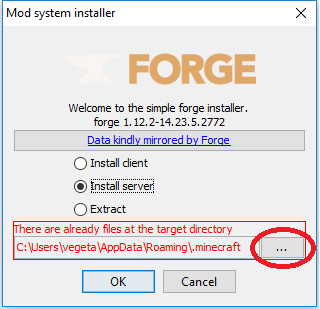
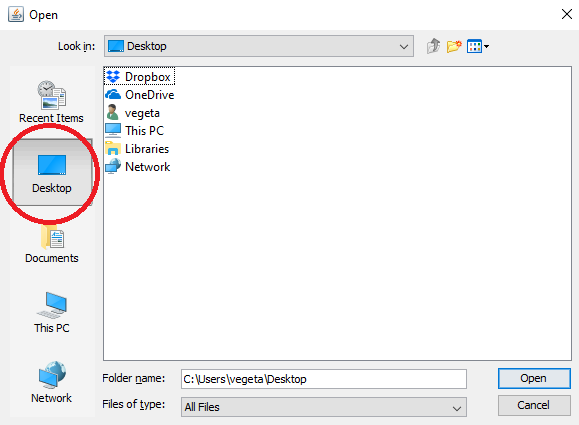
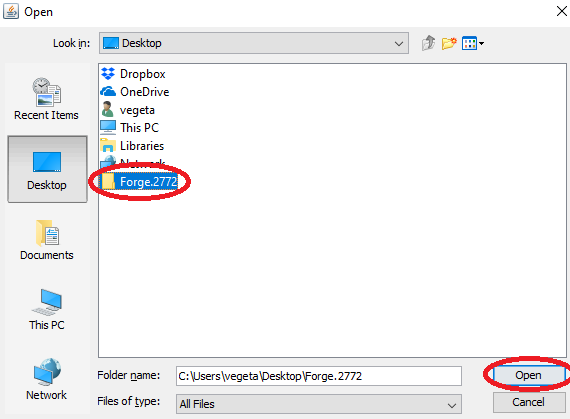
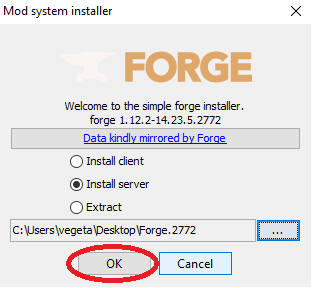
5. Go to the folder on your desktop Forge.2772, delete the minecraft_server.jar file and copy the forge-1.12.2-14.23.5.2772-universal.jar to ForgeMod.jar
Note – The ForgeMod.jar file is case sensitive, ForgeMod.jar is the only way it will work
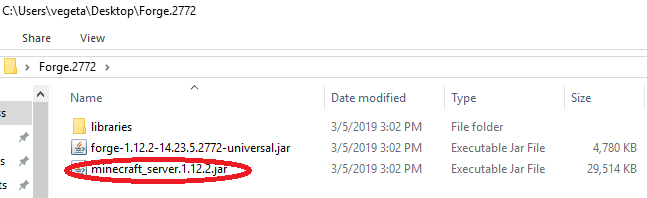

6. Once that is done, go to the servercraft control panel, stop your server and go in the file manager. Delete the ForgeMod.jar forge-1.12.2-14.23.5.2768-universal.jar files and the libraries folder
7. You can use the file manager to upload your files or use an FTP program, either way, you need to copy all the files and folder from your Forge.2772 on your desktop to your root folder on your server. With the file manager you can drag and drop files to upload them
8. Once done, you can start your server
9. You can verify in the console that you upgraded it correctly
DOWNLOAD MODS FOR PC
- Weapon
- Armor
- Furniture
- Decor
- Mobs
- Realism
- Cars
- Magic
- Lucky Blocks
List of Minecraft Mods. Below is the list of Minecraft Mods developed and modified by the Minecraft community.
The latest version is Minecraft 1.16.5 mods, Most popular versions are Minecraft 1.16.4 mods, Minecraft 1.15.2 mods, Minecraft 1.14.4 mods, Minecraft 1.12.2 mods, Minecraft 1.11.2 mods, Minecraft 1.10.2 mods, and Minecraft 1.7.10 mods.!
The post Download Super Heroes Mod appeared first on 24hMinecraft | The Best Minecraft Mods, Mods, Resource Pack.


![汐れいら (Reira Ushio) –ハレの日に (Hare no Hi ni) (2025-08-25) [FLAC 24bit/48kHz]](http://getimg.link/images/2025/09/02/420391.md.jpg)



